
How to Record Sound Clips Using AWS Polly
Use AWS to generate sound clips to be used in auto attendants, office closed clips, and voicemail greetings.
Setting up your phone system can sometimes include the daunting task of writing a script, grappling with the sound of your own voice, and multiple revisions. Instead, you can have a robot record one for you and upload it to your Mango sound clips. Here's how.
Generate a Clip with Amazon Polly
- Sign up for AWS (the Free Tier includes 5 million characters per month).
- Navigate to Services › type “Amazon Polly”.
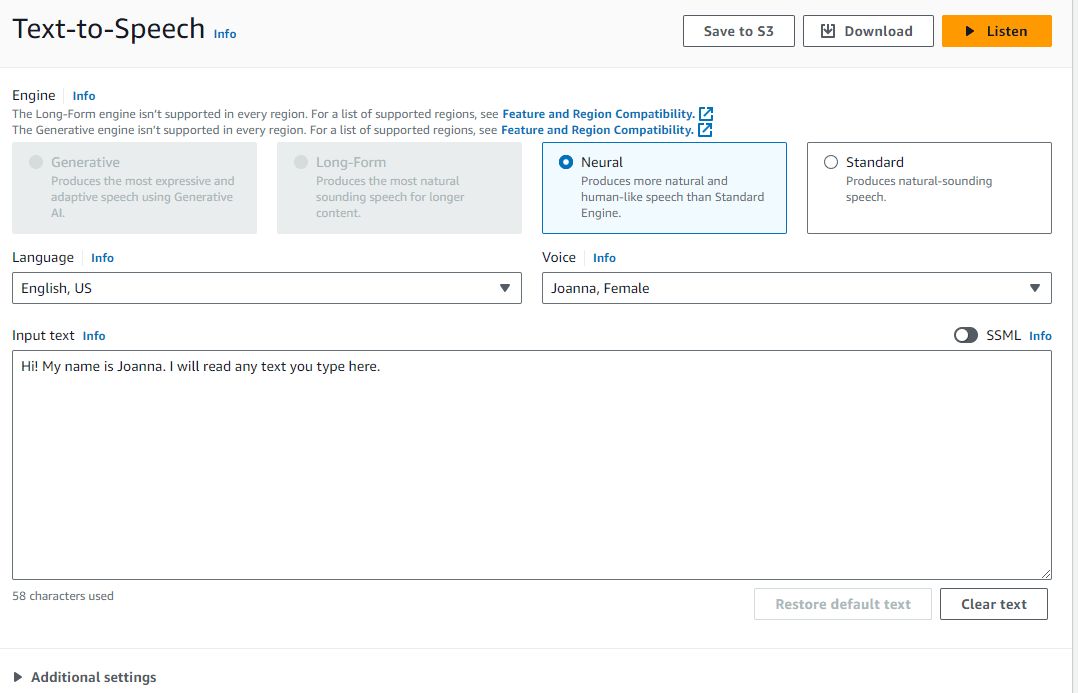
- Type in your message. You can use our more advanced examples below.
- Choose your voice.
- Download the MP3.
- Upload your sound clip to Mango.
Once you have your MP3, head over to Recording a New Sound Clip to upload it to your Mango account.
Tip: We've seen the best results with the voices Joanna and Matthew.
Examples
You'll have to use the SSML (Speech Synthesis Markup Language) tab to use these samples. SSML allows inserting breaths, breaks, and emphasis. Learn about other SSML tags.
After selecting the SSML option in Polly, paste the following samples into your AWS Polly text area and click Listen to hear the speech.
Simple Auto Attendant
<speak>
  <amazon:breath duration="long" volume="x-loud"/>
  <prosody rate="100%">
  <prosody volume="loud">
  Welcome to Acme Dental!
  <amazon:breath duration="long" volume="loud"/>
  </prosody>
  Great smiles, at an affordable price.
  <break time="500ms"/>
  <amazon:breath duration="medium" volume="x-loud"/>
  If you are a new patient press 1
  <break time="400ms"/>
  <amazon:breath duration="medium" volume="x-loud"/>
  If you are an existing patient press 2
  <break time="400ms"/>
  <amazon:breath duration="medium" volume="x-loud"/>
  For other inquiries press 3
  </prosody>
</speak>
Voicemail Greeting
<speak>
  <amazon:breath duration="long" volume="x-loud"/>
  <prosody rate="100%">
  <prosody volume="loud">
  Thank you for calling!
  <amazon:breath duration="long" volume="loud"/>
  </prosody>
  Unfortunately, we are on the phone or assisting other patients
  <break time="500ms"/>
  <amazon:breath duration="medium" volume="x-loud"/>
  Please leave us a message and we will get back to you as soon as possible.
  </prosody>
</speak>
Office Closed Greeting
<speak>
  <amazon:breath duration="long" volume="x-loud"/>
  <prosody rate="100%">
  <prosody volume="loud">
  Thank you for calling Acme Company!
  <amazon:breath duration="long" volume="loud"/>
  </prosody>
  Our office is currently closed. Our business hours are from 8 AM to 4 PM, Monday through Friday
  <break time="500ms"/>
  <amazon:breath duration="medium" volume="x-loud"/>
  Please leave us a message and we will call you back during business hours
  </prosody>
</speak>
How do I get help?
- Mango Voice Support — Phone: (435) 466-2646
- Mango Voice Support — Email: support@mangovoice.com