
How do I turn on / off notifications on the Web App? (Windows Instructions)
Instructions on how to modify or turn on / off the Web App notifications on a Windows machine.
How do I turn on Notifications on Web App (Mac & Windows)
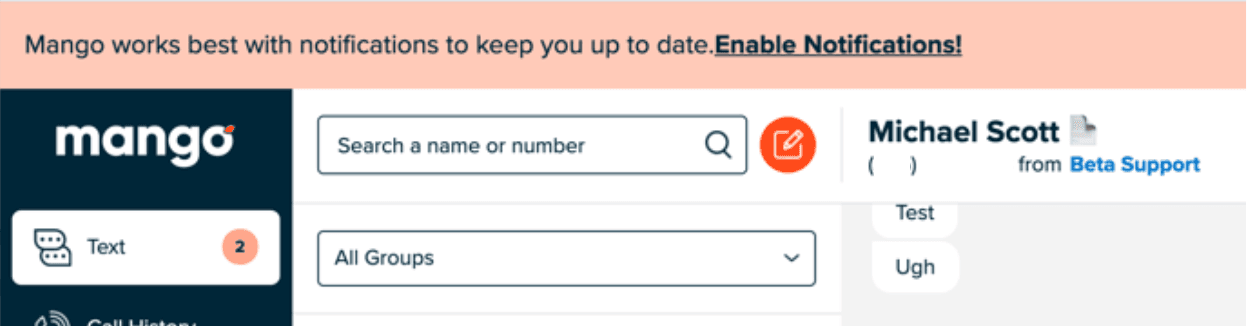
The easiest, easiest, easiest way to turn on notifications is to accept them when you're prompted the first time! If you've dismissed them, or clicked Enable Notifications and then blocked them, it gets more complex — but have no fear, we'll show you how to turn them on.
How do I turn on Notifications if I previously dismissed or blocked them? (Mac & Windows)
You've probably seen the Enable Notifications banner that pops in from the top by now. (You had to click that to turn on notifications.) You might have been in the middle of something, so you dismissed it. How do you turn them on now?
- 1
Head to the bottom left corner where your account name is and click on it.
- 2
Click on Settings.
- 3
Click on Notifications.
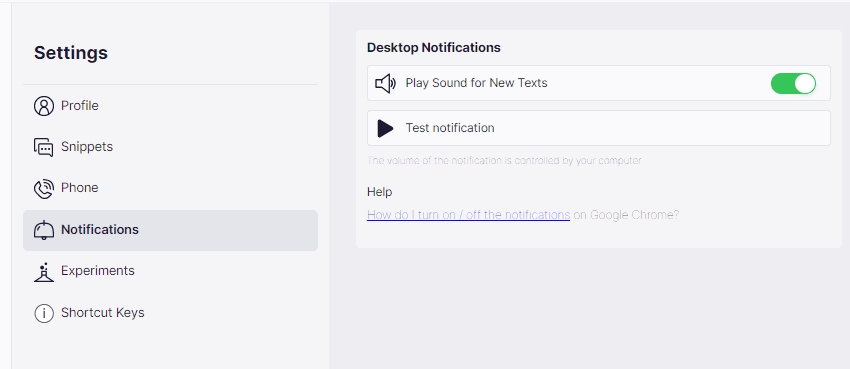
If you've dismissed the notifications banner in the past, you should see a message that says, “You've blocked notifications. You'll need to go into your browser settings to switch this back on.” You'll notice that Play Sound…is technically on but disabled — you can't click it. This is because Enable Notifications has been dismissed or turned off. Have no fear, we'll conquer this together!
Chrome (Mac and Windows)
First things first, exit the settings screen on the Web App.
In the top left of the browser you'll see a small lock icon. Click on it. You can see how this person has these turned off — no one will get sound alerts and operating system notifications when this is off, so flip that switch to on!
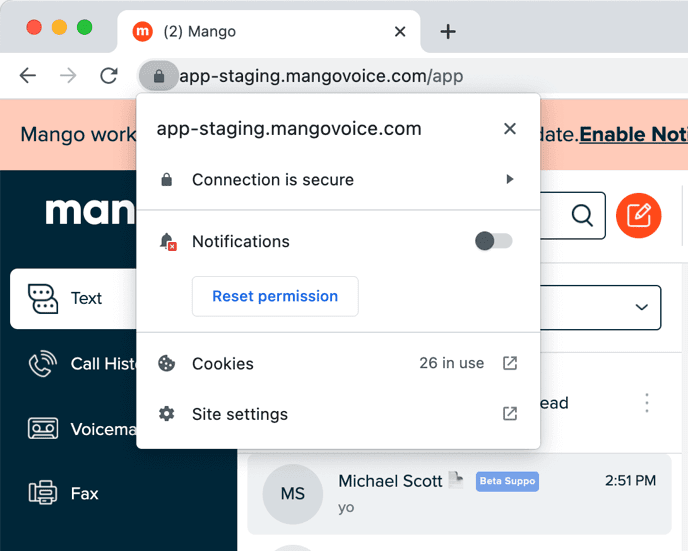
After that, you'll need to reload your web app to make the change live. Send yourself a text from your cell phone to the office text number — you should get an operating system notification and hear a “sound”!
Firefox
You'll need to go deeper into the Firefox settings to turn on notifications. If you go to the Mango Web App settings, you'll see the same notifications text you would have on Chrome (see the Settings Screenshot above).
- 1
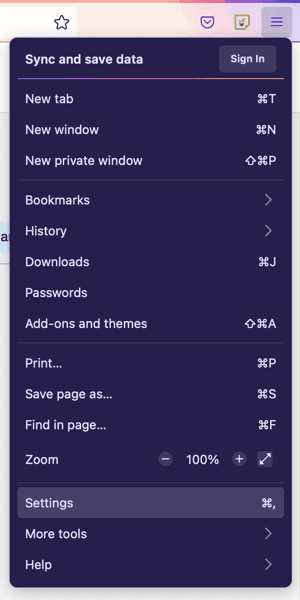
Click on the hamburger (three-line) icon on the far right of the Firefox browser.
- 2
Near the bottom, click on Settings.
- 3
Firefox opens a new Settings tab. In the search box at the top middle, search Notifications, then click Notifications.
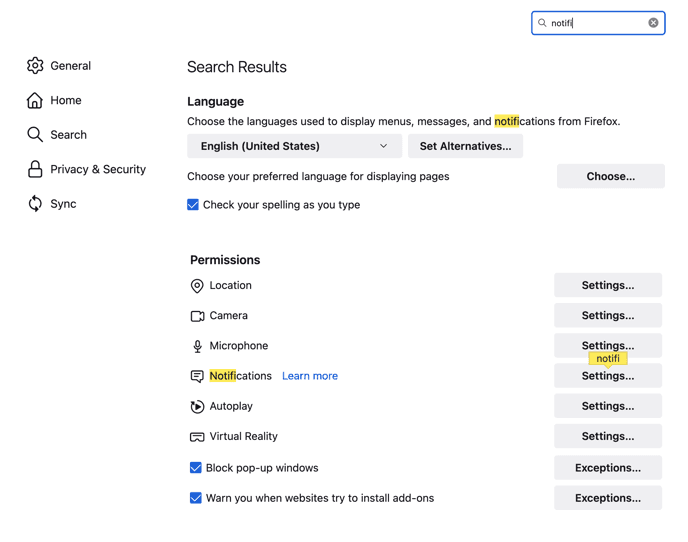
Here's where you can toggle the app.mangovoice.com notifications from Block to Allow. Head back to your web app and reload it. To check quickly whether your notifications are on, click the settings icon Firefox shows in the search area at the top of the browser.
Safari
Sadly, we're not supporting Safari at this time. You'll need to download Firefox, Chrome (or Chrome offshoots like Brave) for notifications to work.
I'm still not getting notifications! (and other questions)
If you're still not getting any notifications, then notifications might be blocked on your machine. Windows has two locations you can adjust notifications and pop-ups, both editable via Settings.
To get to Settings, right-click the Windows icon on your taskbar and select Settings.

Alternatively, you can search Settings with the Windows Search feature.

Let's allow applications to access your notifications
- 1
In Settings, search Notifications Privacy Settings. (Alternatively, click Privacy, then Notifications on the left-hand side.)
- 2
Once there, turn on Allow apps to access your notifications.
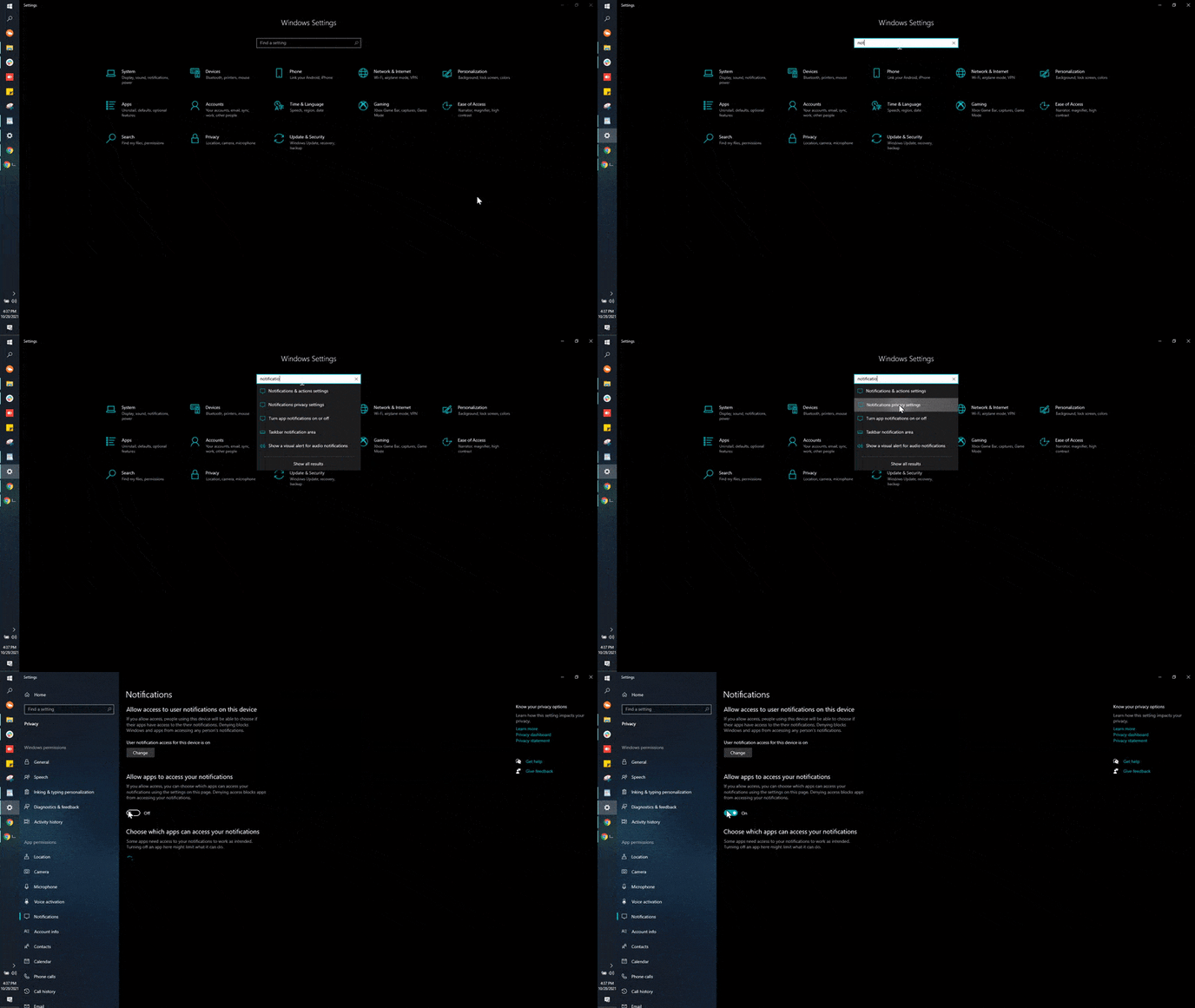
Next, we need to allow those notifications to be sent out. With Settings still open, select System, then Notifications & actions. From there, set Get notifications from apps and other senders and the program you want notifications from (Chrome, Firefox, Edge, etc.) to On.
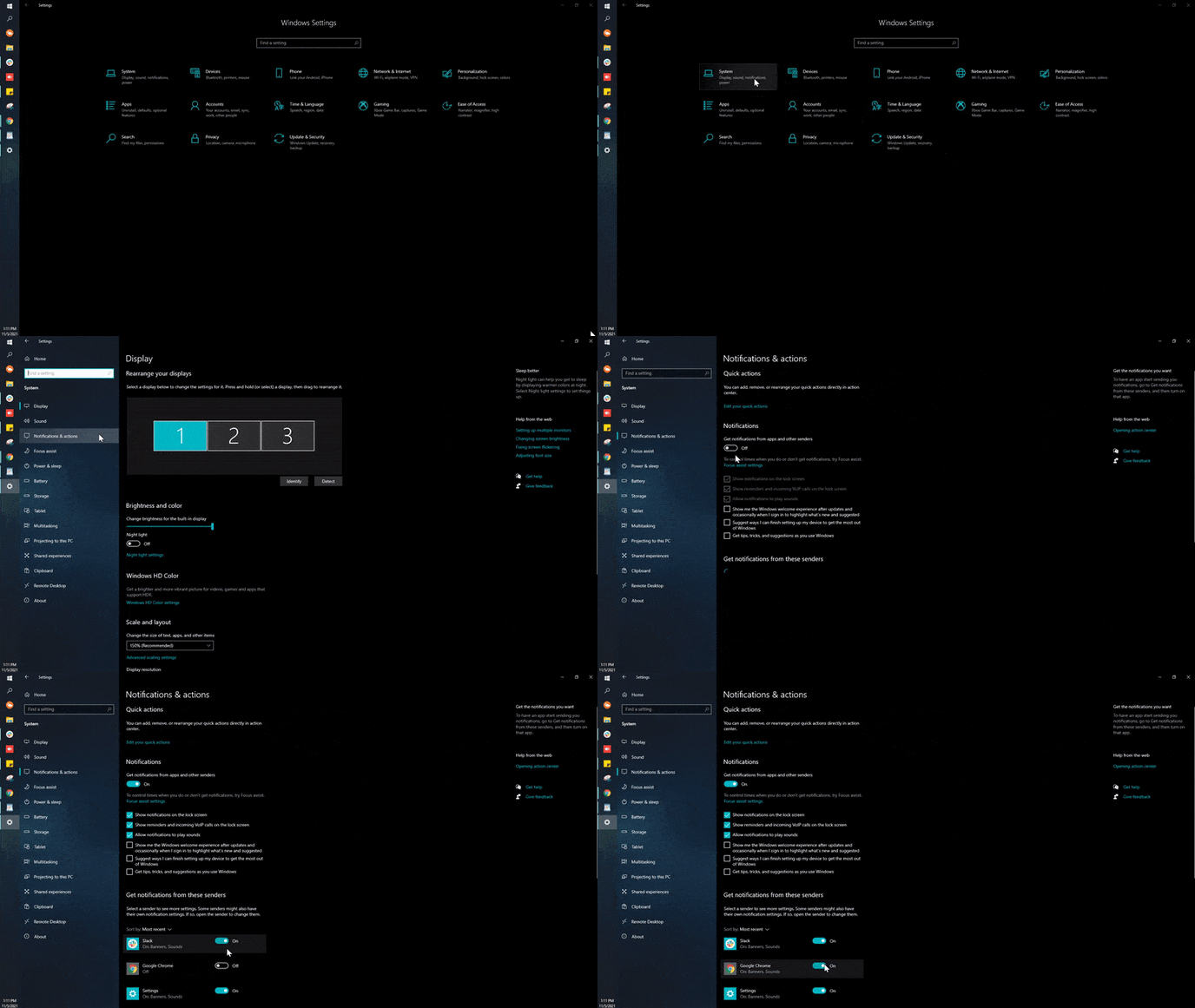
Customize notification sounds
You can keep notifications on but turn the notification sound off. In your Notifications & actions settings, use the Allow notifications to play sounds checkbox to turn sounds on or off. You can get specific by selecting which apps (Chrome, Edge, Firefox) are turned on or off as well.
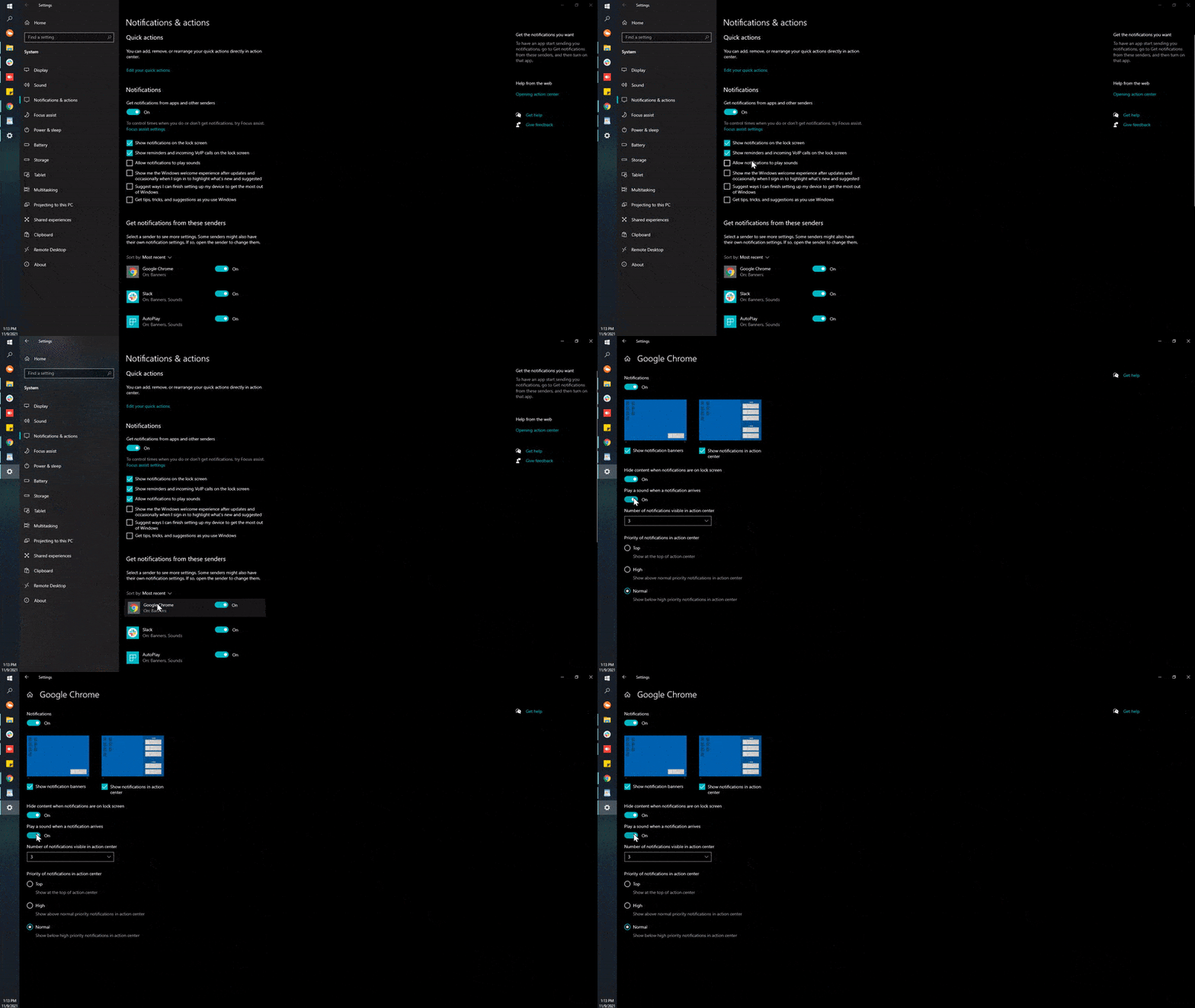
Further reading
If you want to do more reading, see this article on how to turn notifications on or off from our friends at Google.
Still need help?
If you've enabled notifications in both your browser and Windows settings but still aren't getting alerts, reach out and we'll help you track down the setting that's blocking them.
Visit the Support Center