
Transfer and Continue switchboard object
The Transfer and Continue object is our most commonly used object. This object is used to ring a phone or a group of phones (which is called a Ring Group).
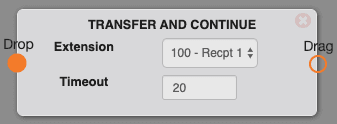
Options
- Extension: This is the phone or group of phones you would like to ring.
- Timeout: The amount of time (in seconds) the phone(s) will ring.
Use cases
You will use this object when you want to ring a phone or group of phones. You can put more than one of these objects in a switchboard. This can be helpful to ring the front desk for a few seconds, place another transfer and continue, then ring the rest of the office phones if the front desk doesn't pick up after a given period of time. If a phone is on DND, has call forwarding, or is unplugged, it will be removed from the transfer and continue and the call flow will continue on.
FAQs
How long should I ring my phones?
A standard ring is roughly 6 seconds long. On average, people normally put 3-4 (18-24 seconds) rings on these objects.
Can I ring my cell phone at the same time as my office phones?
Yes! Reach out to Mango Voice Support to learn about putting your cell phone in a ring group.
How do I get help?
- Mango Voice Support — Phone: (435) 466-2646
- Mango Voice Support — Email: support@mangovoice.com