
1 min read·Last updated: 04.24.2024
Sound Clip switchboard object
The Sound Clip object plays an audio file when a call flows through it. Use it anywhere in your switchboard to greet callers, set expectations, or reinforce your brand before the call continues to its next destination.
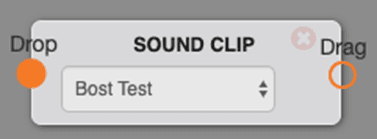
Note: You will need to upload a sound clip before you can select it in the switchboard.
Options
- Select a sound clip to play when the call flows through this object. The entire audio file will be played before the call exits this object.
Use cases
- A greeting or to inform incoming calls that their call “...may be recorded for training purposes...” before directing to a queue or extension.
- Used before a transfer + continue to play “Please hold while we connect you with the next available...”
- Used to brand or identify your company. Ex. “Thank you for calling Mango Voice!”
How do I get help?
- Mango Voice Support — Phone: (435) 466-2646
- Mango Voice Support — Email: support@mangovoice.com