
1 min read·Last updated: 09.17.2024
Schedule switchboard object
Route calls based on your company's business hours. Have custom schedules for holidays.
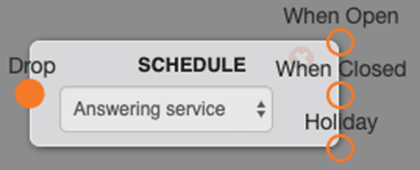
Options
- Select your desired schedule from the drop-down menu.
- When Open — This is where the path will continue to during business hours.
- When Closed — This is where the path will continue to after business hours.
- Holiday — This is where the path will continue during specified holidays.
Learn how to create a Schedule
Use cases
- Use the Schedule object to redirect the flow of your calls while your business is open, closed, and even on holidays!
FAQs
What if I have different hours for different departments?
Create a new schedule object and when the call enters that department's switchboard add the department-specific schedule. You can create unlimited schedules.
Pointers
- Schedules auto-save, so you don't have to hit update to save any changes.
How do I get help?
- Mango Voice Support — Phone: (435) 466-2646
- Mango Voice Support — Email: support@mangovoice.com