
1 min read·Last updated: 04.26.2024
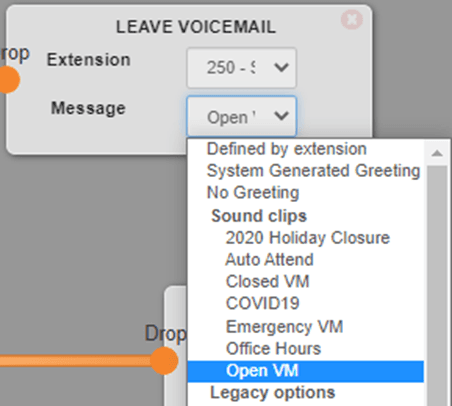
Multi-Voicemail Greetings switchboard object
Multi-Voicemail Greetings recording is great for:
- Creating unique voicemails for every voicemail box, every user, and every holiday that you want.
- Changing between voicemails for special occasions, unusual circumstances, or because you found something more likeable and suitable for your clients.
- There is no limit to how many voicemails you want to create and set up for each voicemail box!
Here is an example of one of our clients who takes advantage of Multi-Voicemail Greetings:
Create a voicemail greeting
To create a voicemail greeting, see the Mango Voice greeting setup guide for details.
Edit per extension in the Mango PBX
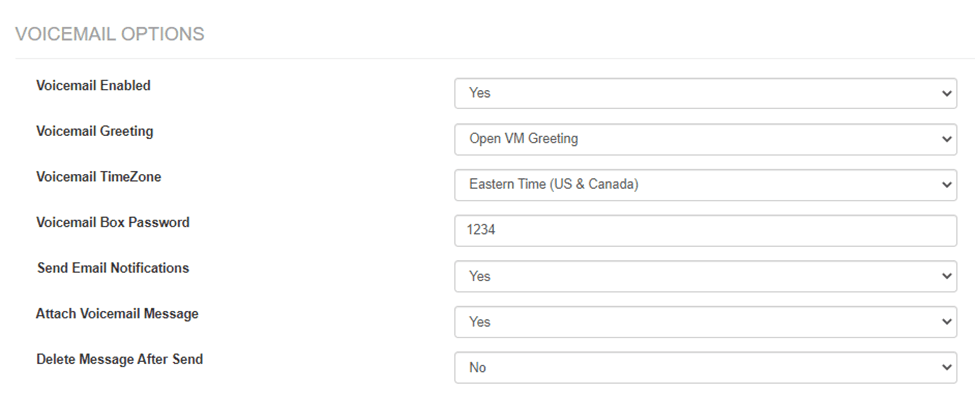
You can also set the greeting for an individual extension in the Mango PBX:
- Log in to the Mango portal.
- Go to Extensions +.
- Select the extension.
- Scroll down to Voicemail Options and select the voicemail greeting you would like to hear.
How do I get help?
- Mango Voice Support — Phone: (435) 466-2646
- Mango Voice Support — Email: support@mangovoice.com