
Fax Detect switchboard object
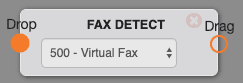
Use the Fax Detect object to listen for an incoming fax tone and route faxes to your fax service while still allowing the same number to receive regular calls.
Options
Fax Detect listens to the line for a fax tone and transfers it to the fax service when a fax tone from the calling party is detected.
Use cases
Note: This switchboard object is deprecated. We recommend customers use a dedicated fax number.
- Fax Detect allows one number to receive both calls and faxes.
Pointers
The fax tone comes in every 4–5 seconds, so it might not detect the fax tone before ringing your phone. This may seem like you are receiving ghost calls, but Mango is detecting faxes and stopping the phone from ringing. It is recommended to make sure there is a larger delay with a sound clip after the Fax Detect object, or a 5-second wait.
Set up your Virtual Fax
First, set up your Virtual Fax extension by following the Mango Voice Virtual Fax setup guide. Once your Virtual Fax is ready, configure it in your switchboard:
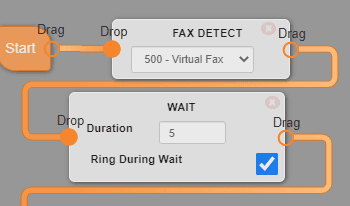
- Right after Start, create the Fax Detect object and select your recently created Virtual Fax.
- Add a 5-second Wait to allow enough time for the Fax Detect to do its magic.
- Connect the Wait to your normal call flow and you're good to go!
The behind the scenes
When you receive a fax, our system converts it into a PDF that can be downloaded from your email or from your Mango Portal.
The email can be changed, or additional emails can be added, by going into your Virtual Fax extension and following this format:
email1@test.com,email2@test.com,email3@test.comHow do I get help?
- Mango Voice Support — Phone: (435) 466-2646
- Mango Voice Support — Email: support@mangovoice.com