
2 min read·Last updated: 07.15.2025
Day / Night Mode switchboard object
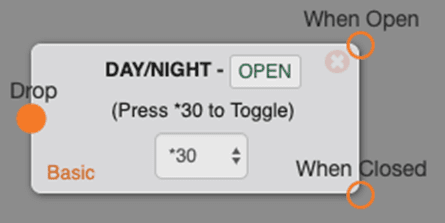
The Day/Night object is a very useful tool that allows you to manually toggle between two different call flows.
Options
- When Open — This is call flow 1, which normally points to your regular scheduled call flow.
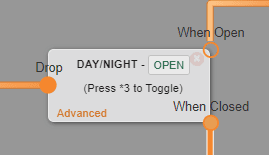
- When Closed— This is call flow 2, which can point to anything you need the manual toggle for, whether it's directly to a voicemail or a cell phone.
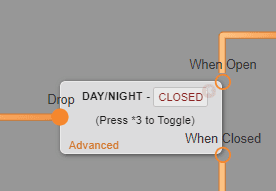
- Press *xx — This is what you will dial to toggle between the two call flows. The basic one is *3. If you need more than one Day/Night mode on your account, you can go into advanced mode, which adds options *30–*39.
Notes
- Every Day/Night object in your system must have a unique *code assigned to it.
- You can toggle this object by clicking it in the switchboard. Toggling this object is immediately active.
Use cases
- This is great to use if you leave your office for lunch regularly and want to forward calls to a cell phone or a voicemail. Any time you need to quickly adjust your call flow to something other than the regular flow, this is the best tool to use.
How do I get help?
- Mango Voice Support — Phone: (435) 466-2646
- Mango Voice Support — Email: support@mangovoice.com