
1 min read·Last updated: 04.25.2024
Conference Room switchboard object
Use the Conference Room to allow multiple phones inside and outside of Mango Voice into a single conference.
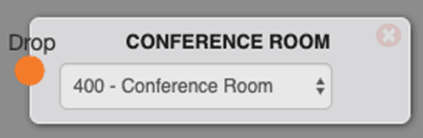
Note: You must configure a conference room before using this object.
Options
- Select the conference room you would like the call to flow into.
Use cases
- Hold your weekly company calls and have everyone call into the same number.
- Quickly set up a conference call by using the internal extension for easy conferencing.
FAQs
Do I have to put a conference room on a switchboard to use it?
You can call directly into your conference room by using its extension number.
How many are allowed in a conference at a time?
Mango Voice can easily support conference calls under 10 callers.
How do I turn off the PIN requirement to enter a conference?
Reach out to Mango Voice Support to learn how to turn PIN requirements off.
Pointers
- This object terminates the call flow.
- Mango Voice conventionally uses a 400–499 extension for conference rooms.
How do I get help?
- Mango Voice Support — Phone: (435) 466-2646
- Mango Voice Support — Email: support@mangovoice.com