
2 min read·Last updated: 04.24.2024
Auto Attendant switchboard object
The Auto Attendant (also commonly known as a Virtual Assistant or IVR) gives the caller options so they can be directed to the correct department. You will need a Sound Clip that states the different options that they can press for this to work properly.
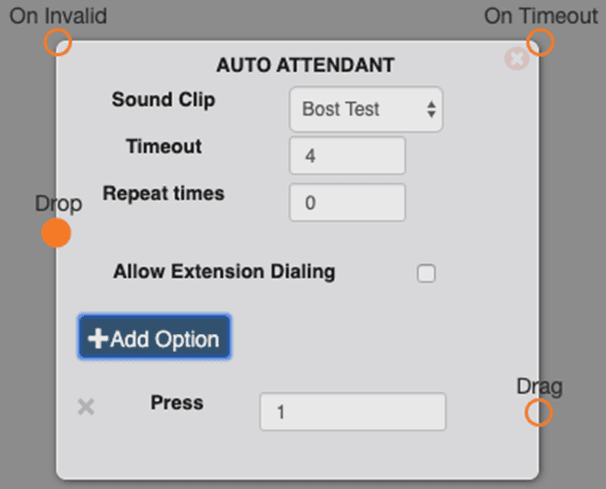
Options
- Sound Clip: This is the sound clip that will play when the call enters this object. You can record a sound clip or upload a sound clip.
- Timeout:This is how long the Auto Attendant will wait (in seconds) after the sound clip before going to the “On Timeout” option.
- On Invalid: If the caller presses an option that is not listed, it will direct the call to this line.
- Repeat times: This box tells the object how many times you want the Sound Clip to repeat itself before it starts doing the Timeout.
- Allow Extension Dialing: If checked, the caller will be able to dial an extension and be transferred directly to that extension.
- +Add Option: Adds an additional Option to the bottom of the Auto Attendant.
- Press X: Input the number you want the caller to press to reach X department. (I.E. 1 for Sales, 2 for Support, 3 for Billing)
Use cases
- This object is great to use if you have more than one department, or just have a certain person that controls specific types of calls (billing, insurance, etc).
- You can add an option for Spanish such as “For Spanish, press 4”. This can be used with the Change Caller ID object to add “ESP” or “SPAN” to the beginning of the caller ID to notify your agents of a Spanish speaking customer. Ex. “SPAN - Maria Gonzalez”
FAQs
How many options can I have?
The Auto Attendant can handle as many options as you need.
If the caller presses an invalid option, can I just have the call loop back to the options?
Yes! Just point the "On Invalid" line back to the Start on the Auto Attendant.
How do I get help?
- Mango Voice Support — Phone: (435) 466-2646
- Mango Voice Support — Email: support@mangovoice.com