
Queue Dashboard Overview
The dashboard will show the calls in the queue, call history metrics, and agent status. Place an agent in the call queue to see them in the agent tables.
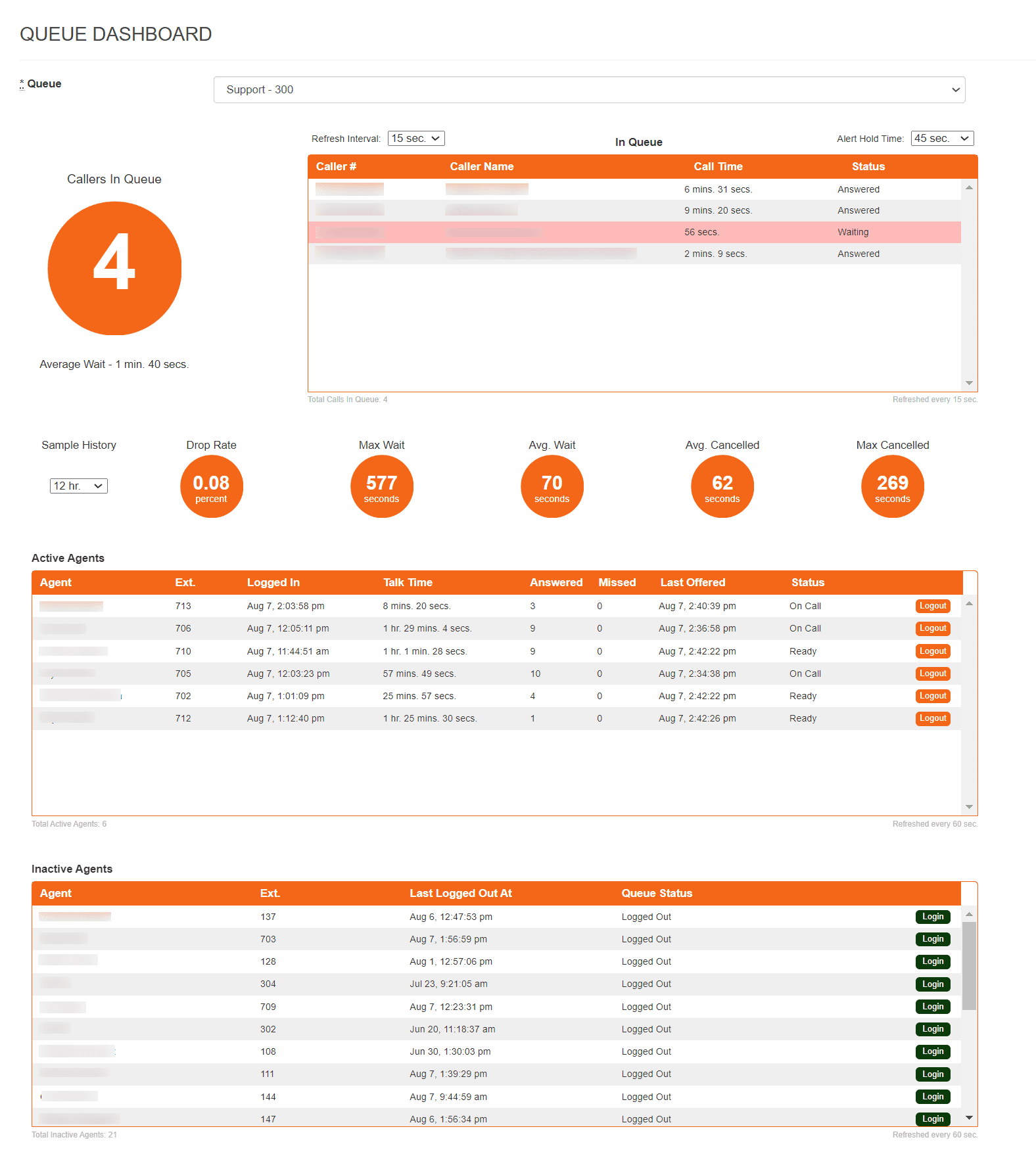
How to Access Queue Dashboards
- Select the + next to Reports on the left side menu
- Select Queue Dashboard
- Select the desired queue to view from the dropdown menu
How to Manage Agent Status
You can manage agent status from the queue dashboard. The agent tables are refreshed every 60 seconds. Please allow refresh time to show the accurate count of agents.
Log in an Agent
- Locate the Inactive Agents table
- Select Login to change the agent status to active
Log out an Agent
- Locate the Active Agents table
- Select Logout to change agent status to inactive
Queue Dashboard Metric Definitions
Mango provides many metrics to help you understand the performance of your queues and agents. They refresh at different intervals based on your preference. The following definitions should aid in understanding queue performance:
Refresh interval - Adjust the number of seconds the system takes to refresh the In Queue caller information.
Alert Hold Time - The number of seconds the system will allow a call to be unanswered until highlighting the cell in red.
Sample History - The timeframe used by the system to calculate call history metrics. Changing this value adjusts all metrics. For example, changing to the last hour as opposed to the last 24 hours will alter how your metrics are calculated.
Drop Rate - The number of calls that entered the queue and hung up before being answered.
Max Wait - The maximum wait time that occurred in the sample history.
Avg. Wait - The average wait time that occurred in the sample history.
Avg. Canceled - The average number of canceled calls in the sample history.
Max Canceled - The maximum number of canceled calls in the sample history.