
2 min read·Last updated: 06.17.2024
Call Pop Overview
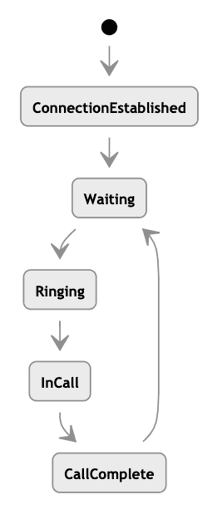
Call Pop States
- Establish Connection
- Waiting
- Ringing
- In Call
- Call Ended
Call Pop Sequence
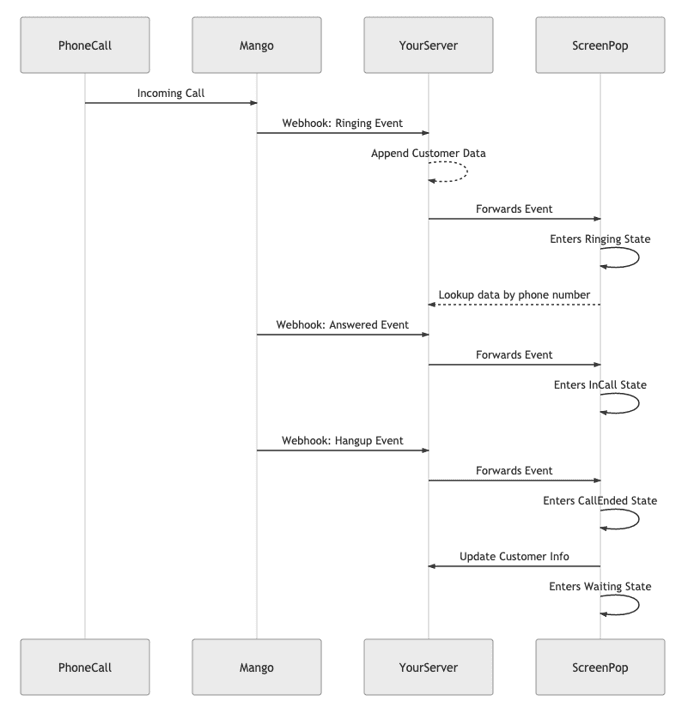
- A call comes in to the phone number.
- The phone number in Mango sends a webhook indicating that an extension is ringing, along with the DID.
- Call pop receives the notification, opens the window, and sends a request to the server to look up the customer by DID.
- The user answers the call.
- Mango sends a call-answered webhook event.
- Call pop receives the Answered event and changes the window as appropriate.
- The user writes notes during the In Call phase.
- The user hangs up the phone.
- Mango sends a call-ended event through the webhook.
- Call pop receives the Hangup event and changes the window appropriately.
- The user enters notes / actions to perform on the system into call pop and submits the changes to the system.
- Call pop enters the Waiting state.
Implementation Considerations
The following are considerations to take when implementing call pop on YourServer:
- How to maintain a consistent WebSocket connection
- How to handle reconnection states for connectivity problems
- How to handle multiple callers at the same time
- How to handle internal calls
- How to handle a new DID
- How to handle system-specific information between call pop and YourServer (handled between call pop and server, or via API)