
1 min read·Last updated: 04.26.2024
How to set up the Practice By Numbers PhoneIQ integration with Mango Voice
Mango Voice setup
- Have the customer reach out to Practice By Numbers support to get their Remote ID.
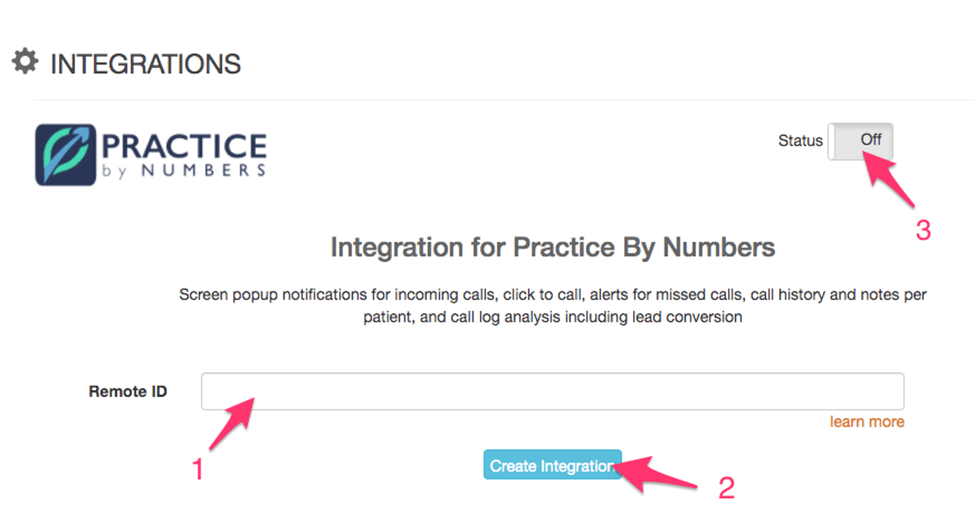
- Then go to the Mango Voice portal and click on the Integrations tab from the left-hand side menu. In the Integrations tab, click Learn More next to Practice By Numbers to enter the Remote ID.
- Click Create Integration.
- Verify the Status is ON.
- Once the connection is established, please download the PhoneIQ app (PbN app) on your office desktop computers (Windows 8+, preferably Windows 10).
- After the PhoneIQ app (PbN app) is installed, log in to it using your existing PbN login credentials. The desktop app will then show patient pop ups for calls coming in to the office.
Sourced from: PhoneIQ compatibility
How do I get help?
- Mango Voice Support — Phone: (435) 466-2646
- Mango Voice Support — Email: support@mangovoice.com