
1 min read·Last updated: 04.26.2024
How to integrate and troubleshoot Dental Intelligence with Mango Voice
Dental Intelligence (used to be Modento) offers two integrations with Mango Voice: the Engagement integration and the Analytics integration. Here is how to set up and troubleshoot each one.
Dental Intelligence Engagement Integration
How do I set it up?
- Call Mango to enable integrations on your PBX.
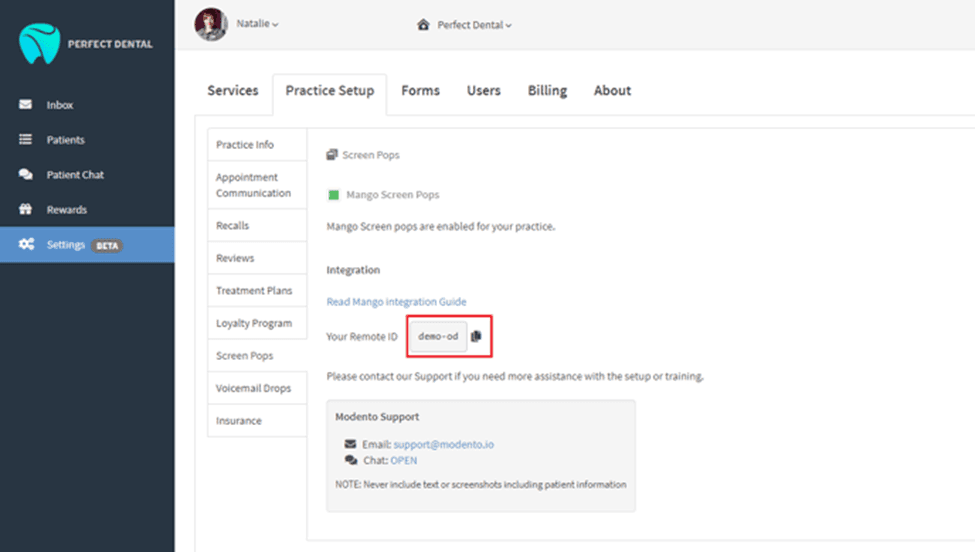
- Copy the ID from your Dental Intelligence account Settings.
- Enter the ID into the Mango Integration.
- Test the Call Pop with a call to the front office to ensure it is integrated.
Where do I find the ID in Dental Intelligence?
Dental Intelligence Analytics Integration
- Enable integrations under company PBX settings.
- Go to the Mango Voice dashboard.
- Click the “Plus Sign” next to “Extensions”.
- Click on “Lines”.
- Click on “New Extension Line”.
- Enable “OutDial® Extension”.
- Under “OutDial Options”, put in the provided “Forwarding Number”.
- Go to “Ring Groups”.
- Add the new “OutDial® Extension” you created to the ring group where you want the Dental Intelligence Analytics applied.
How do I get help?
- Dental Intelligence Support — Phone: (855) 945-1222
- Dental Intelligence Support — Email: support@dentalintel.com
- Mango Voice Support — Phone: (435) 466-2646
- Mango Voice Support — Email: support@mangovoice.com