
1 min read·Last updated: 05.06.2024
Comcast Call Forwarding
While you wait for your numbers to port over to Mango Voice, you can forward your Comcast calls so they keep reaching your team. You can forward calls from My Account or directly from a Comcast phone.
From My Account
Sign in to My Account, select Phone from the Services menu, and do the following for every phone number. (You can change the phone number in the upper-right.)
Note
Do NOT forward the fax number.
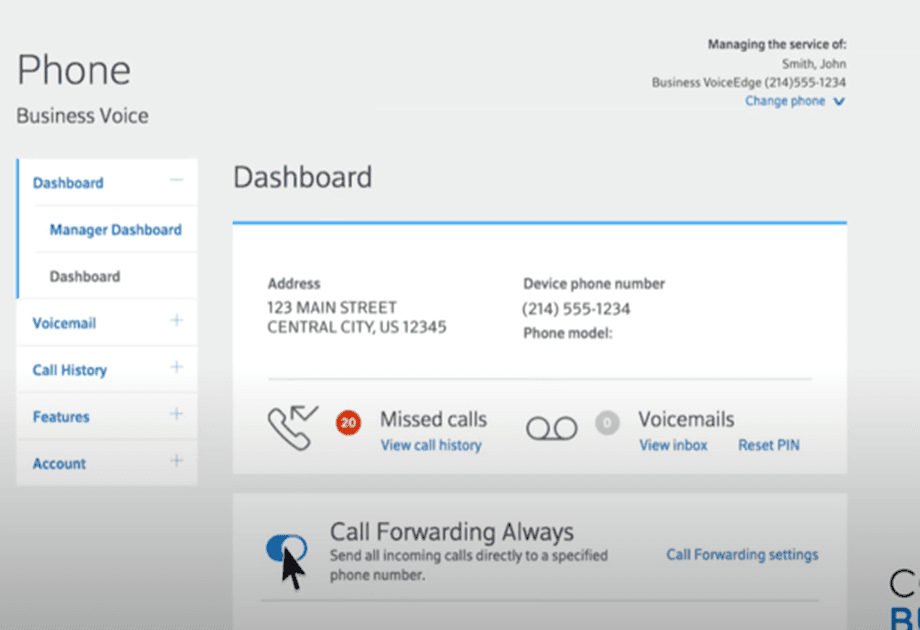
Turn on Call Forwarding Always and enter the temporary number.
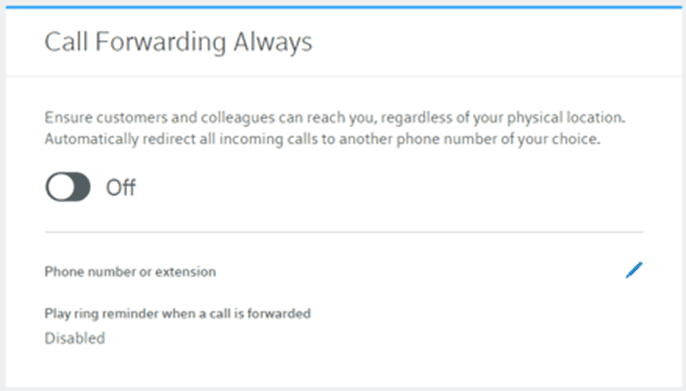
Save and test.
From a Comcast phone
- Lift the receiver and listen for the dial tone.
- Press *72.
- You will briefly hear a stutter dial tone then a normal dial tone.
- Dial the 10-digit destination number where you want your calls to ring.
- Stay on the line until the destination number you have selected is picked up by a colleague or voicemail.
Note
From our experience, this step doesn't happen and a confirmation message that call forwarding is active is played instead.
Test.
How do I get help?
- Mango Voice Support — Phone: (435) 466-2646
- Mango Voice Support — Email: support@mangovoice.com